Why Every Growing Business Needs a Smarter Warehouse

Growth is good—more orders, more SKUs, more customers and channel partners. But inside the warehouse, growth often feels like stress: the 5 pm rush, the return you didn’t expect, the stockout in one city while another sits on overstock. Spreadsheets and paper lists that worked at 50 orders a day begin to crack at 300. The answer is not “more hands” or “bigger racks” alone. The answer is a smarter warehouse—simple, connected workflows powered by a Warehouse Management System (WMS) that give you live inventory, accurate picking, faster dispatch, and the confidence to scale.
This guide explains the why and the how in practical language. Whether you manage a single facility or multiple warehouses across regions, you’ll find a clear roadmap to modernize operations without losing control.
What is a “smarter warehouse”?
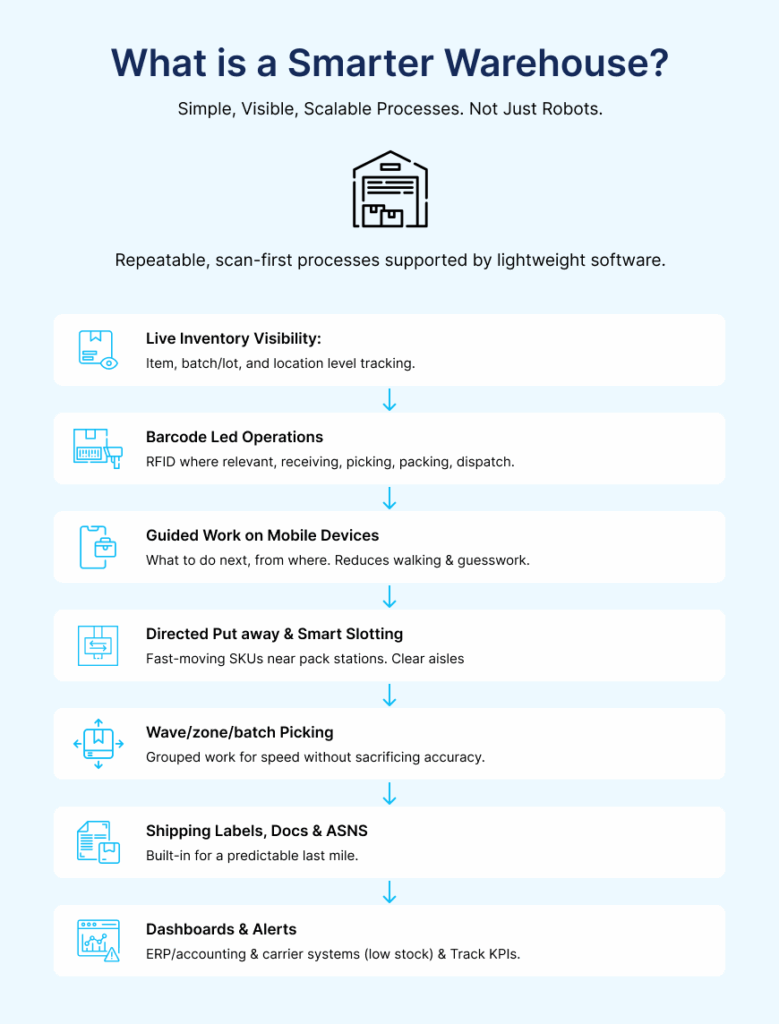
A smarter warehouse is not a room full of robots. It’s a set of repeatable, scan‑first processes supported by lightweight software that everyone can use—from receiving to shipping. The building blocks are straightforward:
- Live inventory visibility at item, batch/lot, and location level (bin, shelf, zone) across single or multi‑warehouse networks.
- Barcode‑led operations (or RFID where relevant) at each touchpoint: receiving, putaway, picking, packing, and dispatch.
- Guided work on mobile devices that tells people what to do next and from which location, reducing walking and guesswork.
- Directed putaway & smart slotting so fast‑moving SKUs live closer to pack stations and aisles stay clear.
- Wave/zone/batch picking that groups work logically for speed without sacrificing accuracy.
- Built‑in shipping labels, documents, and ASNs so the last mile is predictable.
- Clean integrations with ERP/accounting and carrier systems so you maintain one source of truth.
- Dashboards and alerts that surface exceptions (low stock, negative bins, unusual movements) and track KPIs like dock‑to‑stock, pick error rate, OTIF, cycle counting, and space utilization.
Smart means simple, visible, and scalable. Start with the basics, prove value, and expand.
Why growth breaks old ways
When volume rises, manual processes don’t just get slower—they get less accurate. Three friction points appear:
- Visibility: Yesterday’s spreadsheet can’t support today’s decisions. Purchasing, production, and sales argue about “what’s actually available.” Safety stock creeps up, yet you still ship short.
- Accuracy: Paper pick lists and visual checks create mis‑picks, mixed lots, expired items in orders, and painful returns. Every error costs rework time, freight, and customer trust.
- Throughput: At 5 pm, labels, invoices, and handovers pile up. Carriers wait. Teams scramble and overtime becomes routine. The day ends; reconciliation continues.
A smarter warehouse fixes the root cause: unclear signals to people on the floor. When each move is scanned and confirmed, when the system directs the next action, the warehouse becomes predictable—even under pressure.
Nine signs you’ve outgrown your current setup
- We can’t see stock right now (only after late‑night reconciliation).
- Mis‑picks keep happening and returns are rising.
- Putaway is slow, travel distance is high, and aisles feel crowded.
- 5 pm is chaos—labels and documents pile up; trucks leave late.
- Month‑end is a fire drill with GRNs and manual tallies.
- Multiple warehouses = double work; transfers take too long; reservations are unclear.
- Systems don’t talk; ERP and warehouse numbers never match.
- Peak season hurts—overtime increases while accuracy drops.
- No audit trail; hard to answer “who moved what, when.”
If three or more are true, you’re ready to upgrade.
The building blocks (in depth)
Barcode‑led operations
Why it matters: Scanning ties physical movement to a digital truth. At receiving, a scan captures item code, lot/batch, quantity, and expiry. At picking and packing, a scan verifies that the right item leaves the right bin in the right quantity. That single behavior change—scan‑to‑verify—reduces error at the source.
How to implement: – Assign barcodes to items (EAN/UPC or internal codes), bins and shelves, and orders. – Use Android mobiles with sled scanners or rugged handhelds. Ensure spotty Wi‑Fi areas have offline‑tolerant workflows. – Enable pack‑time verification: scan item + order before printing labels. – Train with real orders. A 60‑minute hands‑on session per shift is enough to start.
Outcomes: Inventory accuracy rises, pick error rate falls, cycle counts are faster. The team trusts the system because it reflects reality.
Directed putaway & smart slotting
Warehouse engineering in action: You don’t need a new building to move faster. You need better slotting. Place fast‑movers close to pack stations; store heavy or hazardous items in the right zones; avoid mixing incompatible goods; set min/max levels so replenishment triggers early.
What the WMS does: It suggests the best destination during putaway based on dimensions, weight, ABC velocity, and recent activity. It prevents overfilling and raises low‑stock alerts before a picker arrives at an empty bin. Over time, directed putaway cuts walking, reduces congestion, and improves space utilization.
Guided picking (wave / zone / batch)
- Wave picking releases orders in small, manageable waves by carrier, SLA, or route.
- Zone picking keeps team members within zones, cutting walking time and traffic.
- Batch picking lets you pick the same SKU for multiple orders in one pass; the system then verifies at pack.
Why it works: People move with purpose; scanners confirm each pick; pack stations print correct labels; dispatch becomes a steady flow rather than a late surge.
Multi‑warehouse management
As you add stocking points—regional warehouses, 3PLs, or distributor hubs—hand‑offs multiply. A smart setup provides:
- One live view of every site (sellable, reserved, damaged, in‑transit).
- Simple transfers with reservations and in‑transit visibility.
- Dispatch planning by site, lane, and load.
- Separation of concerns: local teams execute; central teams plan.
When all warehouses read from the same playbook, a stockout in Delhi no longer coexists with overstock in Pune.
Dispatch management
The calm at 5 pm is designed at 10 am. Plan waves by dock, carrier, and SLA; lock pick waves early; print labels at pack; generate ASNs/manifests automatically. Measure OTIF (On‑Time In‑Full) and investigate misses by cause (late pick, missing label, carrier delay). Dispatch management is where WMS meets customer promise.
Dashboards, alerts, and analytics
Leaders need a live view, not a weekend report. Useful widgets include:
- Dock‑to‑stock time (by product and shift).
- Pick accuracy and top error reasons.
- Order cycle time by channel.
- Heatmaps of travel time by aisle and zone.
- Aging inventory by lot/expiry for FEFO.
Alerts should fire for negative bins, unusual returns, and pick exceptions. Analytics turn conversation from opinions to evidence.
ERP integration (and keeping one truth)
Your ERP is the system of record; your WMS is the system of work. Sync product masters, customers, suppliers, and orders; push back shipments and GRNs. Keep one source of truth for master data. Plan integration from day one and test in a sandbox before go‑live.
Compliance, traceability, and audit
For food, pharma, and chemicals, lot/expiry (FEFO) and recall support are essential. A scan‑based audit trail makes audits faster and safer. Even in general manufacturing, traceability reduces dispute time and protects margin.
Warehouse maintenance
Smart doesn’t mean “set and forget.” A light maintenance routine prevents downtime:
- 5‑minute morning: devices charged, printers online, labels stocked.
- Weekly slot review: keep fast‑movers close; remove dead stock.
- Monthly cycle counts: rotating checks instead of big shutdowns.
- Quarterly cleanup: archive inactive SKUs/bins; review user roles and permissions.
ERP vs WMS (plain language)
| Purpose | ERP (Enterprise Resource Planning) | WMS (Warehouse Management System) |
| Focus | Money & orders | Movement of goods |
| Typical owner | Finance/IT | Operations/Warehouse |
| Core jobs | Customers, products, POs, SOs, invoices, accounting | Receiving → Putaway → Picking → Packing → Shipping |
| Best at | Records, reporting, compliance | Floor execution and accuracy |
| Works best when | Acts as system of record | Acts as system of work with scan‑first flows |
They are not rivals. ERP keeps the books; WMS runs the floor—and they sync.
KPI Checklist (measure what matters)
Track weekly and trend it:
- Inventory accuracy (%): difference between system and physical counts.
- Dock‑to‑stock time (min): receiving to putaway completion. – Pick error rate (%): wrong item/qty/lot.
- Order cycle time (min): release to ship confirm.
- Fill rate / OTIF (%): delivered on time and in full.
- Space utilization (%): used vs available bin capacity.
- Lines picked per hour: productivity by shift and zone.
- Returns due to mis‑picks (%/#): quality signal.
- Travel distance/order and congestion hotspots: the engineering view.
ROI: Simple math that leaders trust
Assumptions (typical mid‑size site): – 1,200 orders/month × 4 lines = 4,800 lines. – Current pick error rate: 2.5% → 120 mis‑picked lines/month. – Cost per mis‑pick (rework + reship): ₹350. – After WMS + scanning, error rate drops to 0.8%.
Savings on mis‑picks: – Errors avoided/month = 4,800 × (2.5% − 0.8%) = 82 lines. – Monthly cost avoided = 82 × ₹350 = ₹28,700. – Annual savings = ₹344,400.
Receiving productivity: – Dock‑to‑stock improves from 90 → 55 minutes per GRN. – With ~400 GRNs/month, minutes saved = 35 × 400 = 14,000 minutes (~233 hours).
Inventory carrying cost: – With FEFO and accurate visibility, overstocks drop. Even a 3–5% reduction in average inventory has a substantial cash impact; apply your holding cost to quantify.
Add mis‑pick savings + labor hours + carrying cost. For many businesses, payback is measured in months, not years.
30‑day roadmap (from paper to predictable)
Week 1 — Map and choose
Walk the floor with your team. Sketch the flow Receive → Putaway → Pick → Pack → Ship. Identify the top 20 SKUs by volume and pick one KPI (e.g., pick accuracy) for the pilot.
Week 2 — Set up basics
Create bin labels, item barcodes, and order labels. Configure directed putaway rules and pick paths. Prepare devices and printers. Decide how carrier labels and ASNs will be generated.
Week 3 — Train and pilot
Run two 60‑minute hands‑on sessions per shift. Start a 5–7 day pilot in one zone. Track dock‑to‑stock, pick errors, and order cycle time. Capture daily feedback from operators.
Week 4 — Review and scale
Compare KPI before vs after. Fix bottlenecks (slotting, wave size, label stations). Roll out to more aisles and teams; document standard work and appoint floor champions.
7‑day starter plan (quick wins)
- Day 1: Print bin labels; move top 30 fast‑movers closer to pack.
- Day 2: Switch to scan at receiving; auto‑create GRNs.
- Day 3: Turn on directed putaway for top SKUs.
- Day 4: Pilot guided picking for one wave.
- Day 5: Enable pack‑time verification + shipping label print.
- Day 6: Start cycle counts in one aisle; schedule weekly repeats.
- Day 7: Review KPIs; lock the new standard and plan the next zone.
People and change (the adoption piece)
Technology doesn’t fail—adoption does. Frontline teams need:
- A clear why: “Scanning cuts rework and overtime; we all get home on time.”
- Short, hands‑on training: 60 minutes per shift with real orders, not slide decks.
- Visible champions: one respected operator in each shift/zone who can coach and escalate.
Make it safe to report issues; fix problems in hours, not weeks. Celebrate small wins publicly. Adoption is a leadership habit.
Hardware, infrastructure, and security
- Mobiles/scanners: Android + sled scanners or rugged handhelds; start with a shared device pool.
- Label printers: 203/300 dpi, networked; keep spare ribbons/labels; clean weekly.
- Wi‑Fi: survey aisles; add access points near docks and pack areas.
- Power & charging: wall racks and color‑coded batteries; enforce end‑of‑shift charging.
- Security: role‑based access, strong passwords, audit logs, regular backups.
Advanced automation (add when ready)
Once scan‑first workflows are stable and data is clean, consider: – RFID for hands‑free movement in high‑value or closed‑loop zones. – Vision + AI for carton identification, damage checks, or pick‑to‑light guidance. – AS/RS and conveyors where throughput justifies capex. – Yard & dock scheduling to reduce inbound queues and dwell time.
Treat each as a separate ROI case and pilot in one area before scaling.
Common mistakes to avoid
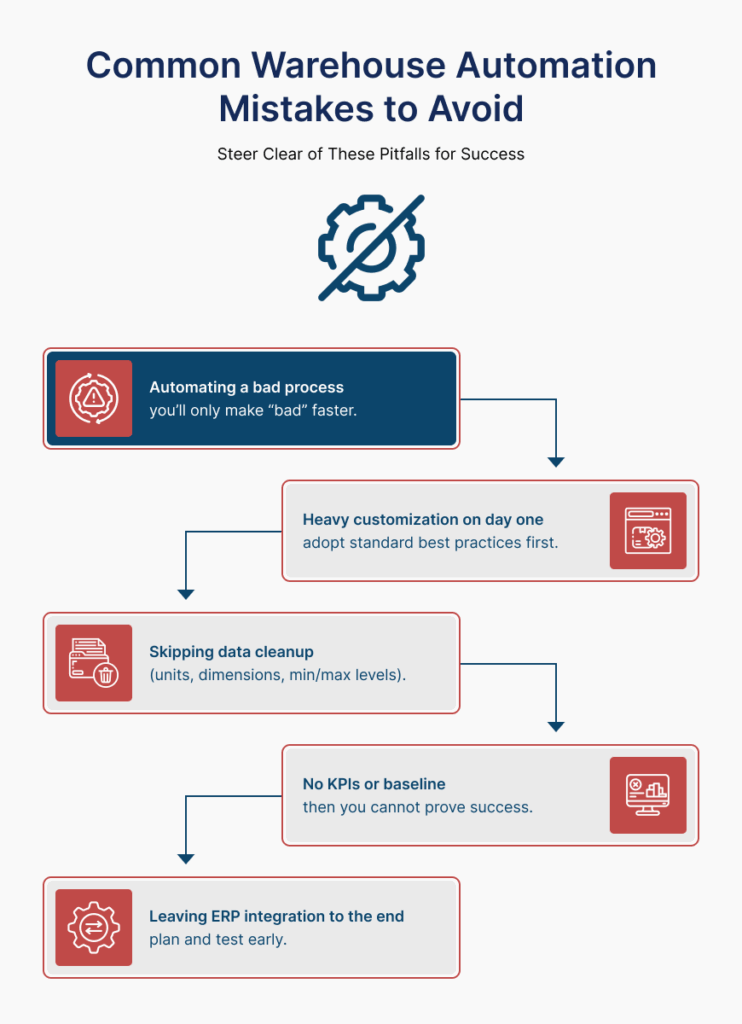
- Automating a bad process; you’ll only make “bad” faster.
- Heavy customization on day one; adopt standard best practices first.
- Skipping data cleanup (units, dimensions, min/max levels).
- No KPIs or baseline; then you cannot prove success.
- Leaving ERP integration to the end; plan and test early.
Real‑world snapshots
A) Fast‑growing D2C brand
Pain: order spikes, size/color errors, costly returns.
Fix: batch picking with scan‑to‑sort; pack verification; carrier labels at station.
Result: fewer returns; same‑day ship rate up; happier customers.
B) Regional manufacturer with three warehouses
Pain: overstock in one city, stockouts in another; long reconciliations.
Fix: live multi‑warehouse view; transfers with in‑transit tracking; dispatch by lane and load.
Result: lower carrying cost; reliable promise dates.
C) Seasonal exporter
Pain: peak‑season overtime; missed ETDs.
Fix: wave planning by carrier/SLA; dock schedule; pack‑station labels.
Result: calmer evenings; higher OTIF; fewer chargebacks.
D) Regulated (food/pharma)
Pain: audits and recalls are stressful.
Fix: lot/expiry tracking (FEFO), recall workflows, clean audit trail.
Result: faster audits; tighter compliance.
FAQs
Do small businesses really need a WMS?
If you pick and ship daily, yes—start light. Barcodes, guided picks, and label printing pay back quickly.
How long does implementation take?
A focused pilot can go live in 2–4 weeks for one zone/line; scaling depends on training and data readiness.
Will it work with our ERP (Tally/Zoho/others)?
Yes. We sync master data and orders, then push back shipments and GRNs. The goal is one source of truth.
Barcode or RFID?
Start with barcodes—cheap, proven, fast. Add RFID later for specific high‑value zones.
What hardware do we need?
Android phones with sled scanners, label printers, Wi‑Fi; begin with a shared pool.
How do we manage returns (RMA)?
Treat returns like inbound: scan, grade, restock or quarantine with reason codes to drive root‑cause fixes.
Can we manage kitting or light assembly?
Yes—use WMS work orders to consume components and produce finished goods with lot tracking.
How do we handle hazardous materials?
Use compatibility rules in directed putaway; add location restrictions and extra checks at pick/pack.
Is this overkill for a single warehouse?
No. Even one site benefits from live visibility, scan‑to‑verify, and dispatch planning. Start small; grow steadily.
Ready to make warehouse work simple?
Talk to EZEONE Technologies about a free consultation or a free warehouse audit. We’ll map your flow, pick one KPI, and get you a pilot plan you can execute in weeks—not months.
Outcome we aim for: fewer errors • faster dispatch • clearer decisions.