Every Business Call Accounted For: The Complete Guide to EzeOne Smart SIM-Based Call Management Software

A practical guide to reducing missed-call leakage, connecting calls with leads, improving follow-up discipline, and building better sales visibility with EzeOne Smart Calling.
A business can invest in products, marketing and customer service—and still lose business after the phone rings.
In many businesses, the call happens but the business record does not. A new enquiry reaches one employee’s phone. A channel partner asks for product availability. A buyer promises payment. A customer requests service. The conversation remains in a personal call log, notebook, WhatsApp chat or memory, while management sees it only after a manual report—or when the customer calls again.
That is the difference between making calls and managing calls.
A smart call management system makes business conversations visible and actionable. It helps identify who called, who handled the interaction, whether it connected, what was agreed, when the follow-up is due and whether the lead, customer, partner or service record was updated.
For businesses, this matters because one phone can support enquiries, quotations, business orders, payment commitments, dispatch coordination, warranty complaints and technician updates. The call may finish in two minutes, but the responsibility can continue for days.
This guide explains where calls leak, what unmanaged calling costs and how EzeOne Smart Calling adds accountability without forcing a business to operate like a large call centre.
1. Why Business Calls Still Matter in a Digital-First World
Digital channels have expanded rapidly, but business relationships still depend heavily on human conversations. A customer wants an immediate answer about availability. A buyer wants clarification before approving a quotation. A patient needs an appointment confirmation. A property buyer wants to discuss a site visit. A customer with a service issue wants reassurance. An accounts team follows up on an outstanding invoice.
These situations are not always resolved by an email or a form. They are resolved through a call because a call is direct, contextual and fast.
This is especially true in India, where sales and service activity often extends across cities, branches, customer locations and field territories. The team is mobile. Employees work from company phones or approved business SIMs. Conversations happen while travelling, at customer locations, from factory offices and during field visits.
A 2025 ICRIER study surveyed 2,365 Udyam-registered businesses and highlighted the continuing importance of offline channels even as digital adoption grows. The practical message is not that businesses should replace their existing way of working with expensive call-centre infrastructure. The opportunity is to add digital visibility, accountability and reporting to the mobile calling process they already use.
The phone, therefore, should not be treated as a disconnected device. It is an operating point in the customer journey.
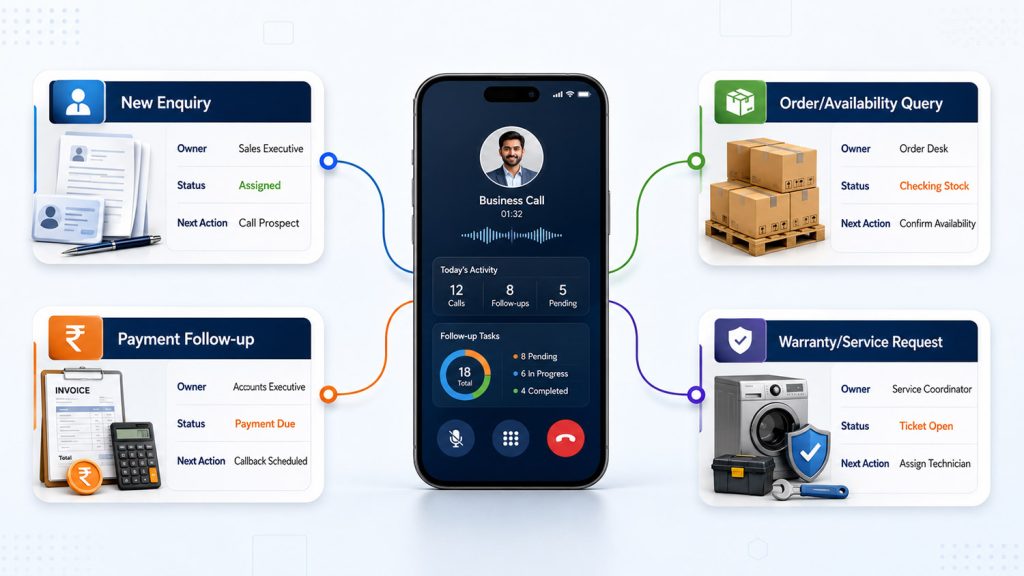
When a prospect calls, the call should relate to a lead. When a channel partner calls, it should relate to the relevant account. When a customer asks for service, it should relate to a ticket or product history. When a buyer promises payment, the commitment should become a dated follow-up. When an employee calls from the field, management should be able to review the business activity without waiting for an Excel sheet.
That connection between call activity and business action is the foundation of a modern call management system.
2. What Is a Smart Call Management System?
A smart call management system is a mobile-and-cloud solution that captures approved business-call activity and organises it into a central management view. Depending on the selected setup, it can connect calling information with leads, customers, partners, tickets and follow-ups.
At a basic level, it answers questions such as:
- How many incoming and outgoing calls did the team handle?
- Which calls were missed, rejected, unanswered or never connected?
- Which employees were active, and during which working hours?
- Which assigned leads were not contacted?
- Which calls need a callback or follow-up?
- What is the call history of a lead, customer or channel partner?
- Which lead statuses changed after communication?
- Can management receive daily or periodic reports without manual compilation?
A stronger system goes beyond call logs. It creates a chain of responsibility:
Call captured → person identified → record matched → owner assigned → outcome updated → follow-up scheduled → manager informed.
That chain is important because a call log by itself is historical. It tells you that something happened. A business workflow tells you what should happen next.
For example, “Missed call at 11:14 AM” is information. “Missed customer call assigned to the relationship owner, callback due by 11:30 AM, outcome pending” is an actionable process.
Similarly, “Outgoing call lasted four minutes” is only activity data. “Quotation discussed, technical drawing requested, follow-up scheduled for Thursday” creates usable sales context.
EzeOne Smart Calling is designed to provide this visibility through a mobile application and a central cloud-based dashboard. The wider EzeOne platform can connect the calling layer with lead management, sales workflows, channel-partner management, warranty and support, reporting dashboards, WhatsApp communication and API-based integrations, depending on the agreed implementation scope.
The objective is not to create more data. The objective is to reduce forgotten actions, improve response discipline and preserve business history beyond one employee’s phone.
Why Ordinary Mobile Call Logs and Manual MIS Are Not Enough
A mobile call log is useful for the person holding the phone. It is not a complete management system for the organisation. It rarely shows why the call happened, which business record it belongs to, what the outcome was, who owns the next action or whether the promised response was completed.
Many businesses fill the gap with screenshots, WhatsApp updates, Excel sheets and end-of-day reports. These methods may work with a very small team, but they become fragile as the company adds people, territories, products and campaigns.
The main problems are straightforward. Reports arrive after opportunities have aged. Information depends on memory and self-reporting. A large call count can appear productive even when few useful conversations occur. Customer history remains split across phones, email, CRM and WhatsApp. When an employee is absent or leaves, the organisation may lose context.
A smart calling system does not remove the need for human notes or judgement. It reduces the distance between the call and the action by bringing system-captured activity, lead status, follow-ups and employee-wise reporting into a central view.
4. The Hidden Places Where Business Calls Leak
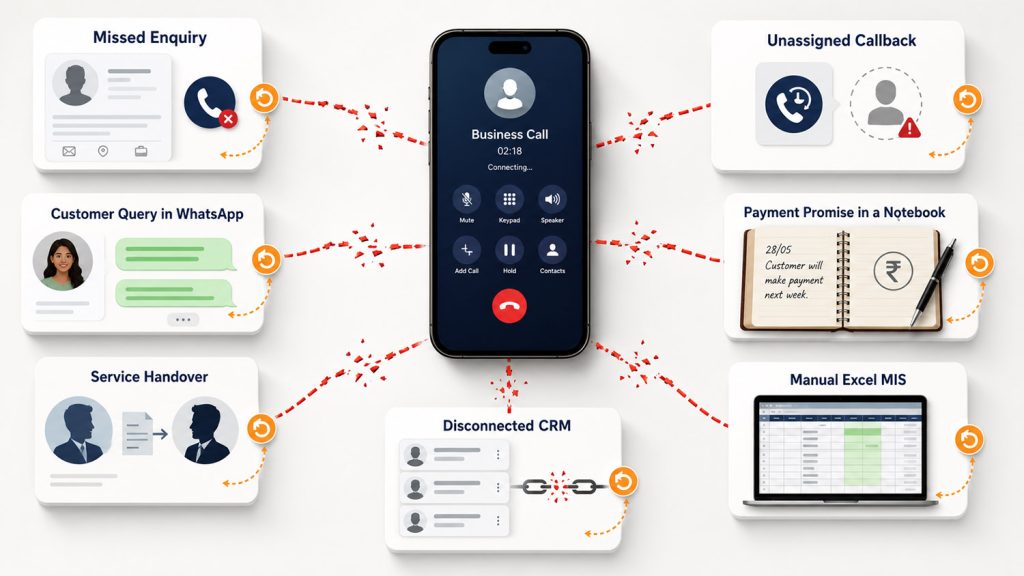
Call leakage often looks ordinary:
“I will call him later.”
“I thought the service team handled it.”
“The lead was not assigned to me.”
“I shared the details on WhatsApp.”
Each statement appears harmless. Together, they create lost enquiries, repeated coordination, slower collections and weaker customer trust.
4.1 A new enquiry reaches one employee’s phone
A prospect calls directly and receives a promise that details will be shared. No shared lead is created and no backup owner exists. If the employee becomes busy, the opportunity disappears from the active pipeline.
4.2 A missed call remains only a missed call
The real problem is not that a call was missed; it is that nobody owns what happens next. The organisation needs to know whether the caller was a prospect, partner or customer, who should call back and whether the callback was completed.
4.3 A promised callback has no due time
“Call me after 4 PM” is a clear request. If it is not converted into a visible follow-up, it competes with every other task in the employee’s day and becomes unavailable to the rest of the team.
4.4 Customer, order and payment discussions become scattered
A channel partner asks for stock or a buyer promises payment. The employee sends a WhatsApp message or writes a note, but the call, internal request and final outcome remain disconnected. The caller follows up again because closure is not visible.
4.5 Service complaints lose context during handover
A customer speaks first to sales, then support and then a service coordinator. Without a connected ticket or timeline, the customer repeats the problem and the organisation risks wrong routing or delayed action.
4.6 Management waits for manual MIS
The Sales Head wants missed calls, leads not contacted and employee-wise activity. Instead of opening a dashboard, the manager waits for a spreadsheet and reviews yesterday rather than managing today.
4.7 The CRM and the phone hold different halves of the truth
The CRM shows “follow-up pending,” while the phone shows three attempts and one connected conversation. A connector or API may be needed so the call event, notes, status and next action stay closer to the same business record.
4.8 Personal and business boundaries remain unclear
Dual-SIM and employee-device use cases require approved numbers, exclusions, role-based access and a written policy. Without clarity, employees may resist the system because they fear personal surveillance.
5. The Business Cost of Not Adopting a Structured Calling Solution
The cost of unmanaged calls is larger than one lost lead. It affects sales, service, management time and customer confidence.
Unmeasured opportunity loss: When source, owner and outcome are missing, the company cannot see how many phone enquiries were contacted, qualified or lost. Marketing may buy more leads while existing calls remain under-managed.
Slow response: A prospect often contacts several suppliers. The company that responds clearly and follows up on time appears more dependable. Many lost prospects never complain; they simply choose someone else.
Inconsistent customer service: Without shared history, every interaction starts again. Repeated explanation makes the organisation appear internally disconnected.
Manual management effort: Employees prepare reports, supervisors compare versions and managers chase missing details. A central dashboard moves review meetings from data collection to action.
Subjective performance reviews: Reliable call and lead data supports fairer coaching, provided managers combine activity with connected conversations, follow-up completion and business outcomes.
Scalability risk: Informal processes that work with five users may fail with twenty. More employees and territories create more handovers. A structured system helps the business grow without multiplying coordination gaps.
The value of call management therefore comes from decisions: recover a missed enquiry, redistribute an untouched lead, schedule a promised callback, preserve customer history and identify where a process is delayed.
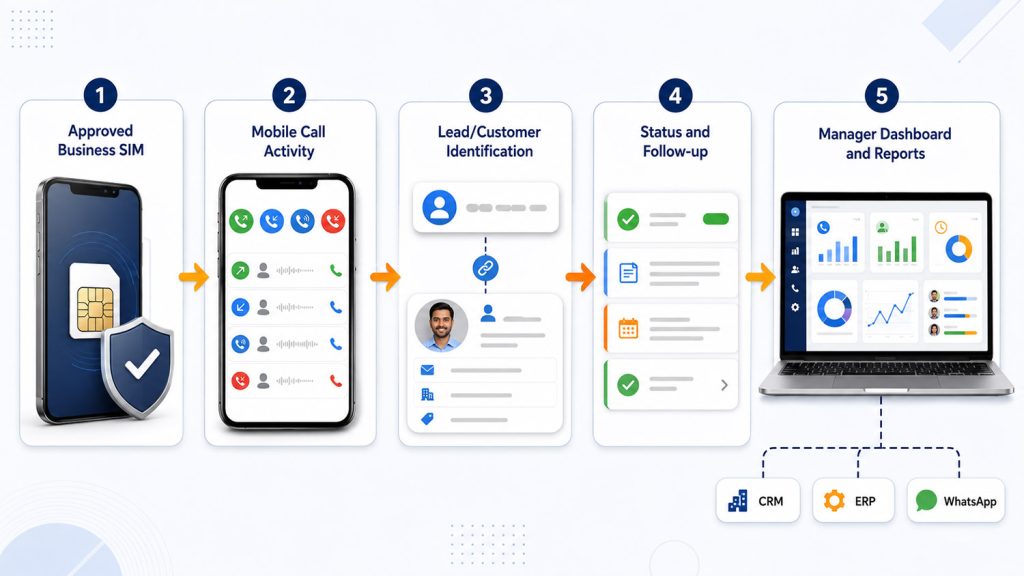
6. How EzeOne Smart Calling Works
EzeOne Smart Calling is designed as a visibility and accountability layer around the business calling process.
The exact configuration can vary by organisation, device policy, user role and integration scope, but the operational flow is straightforward.
Step 1: Define approved business users and numbers
The company identifies the salespeople, telecallers, customer-support executives, service coordinators or other authorised users who will participate. Approved business numbers and compatible Android devices are mapped during implementation.
For dual-SIM use cases, the organisation can decide which SIM is connected to the business workflow. Internal or personal numbers can be excluded based on the selected setup and policy.
Step 2: Install and configure the mobile application
The EzeOne application is installed on the authorised user’s smartphone. Permissions, number selection and synchronisation settings are configured according to the agreed scope.
The user can continue calling through the familiar mobile process instead of learning a complex desktop dialler. The call itself uses the mobile network in a SIM-based setup, while system data synchronises with the cloud dashboard when connectivity is available.
Step 3: Capture call activity
Incoming and outgoing business-call activity can be captured with information such as date, time, direction, duration and connection status. Managers can review categories including missed, rejected, unanswered, unique and connected calls according to the available reporting configuration.
Step 4: Connect the call with business context
Where lead or CRM workflows are enabled, the system can associate the activity with a lead, customer, partner or ticket. The employee can update notes, status or the next action instead of maintaining a separate manual report.
Step 5: Create follow-up accountability
A promised callback or next conversation can be scheduled. Leads can be assigned or distributed. Managers can identify “not contacted” cases and overdue actions rather than searching individual phones.
Step 6: Review central dashboards and reports
Authorised managers can view team and employee-wise activity, call history, working-hour information, lead reports and daily or periodic summaries. Reports can support management review, coaching and process improvement.
Step 7: Integrate with the wider business system
Depending on requirements, EzeOne Smart Calling can connect with EzeOne Lead Management, Sales Force Automation, Channel-Partner Management, Warranty and Support, WhatsApp workflows, existing CRM software or custom APIs.
The goal is one connected sequence: the business call becomes a business record, and the record produces a visible next action.
7. Core Features and Their Practical Business Outcomes
The best way to evaluate a calling solution is to connect each feature with a management outcome.
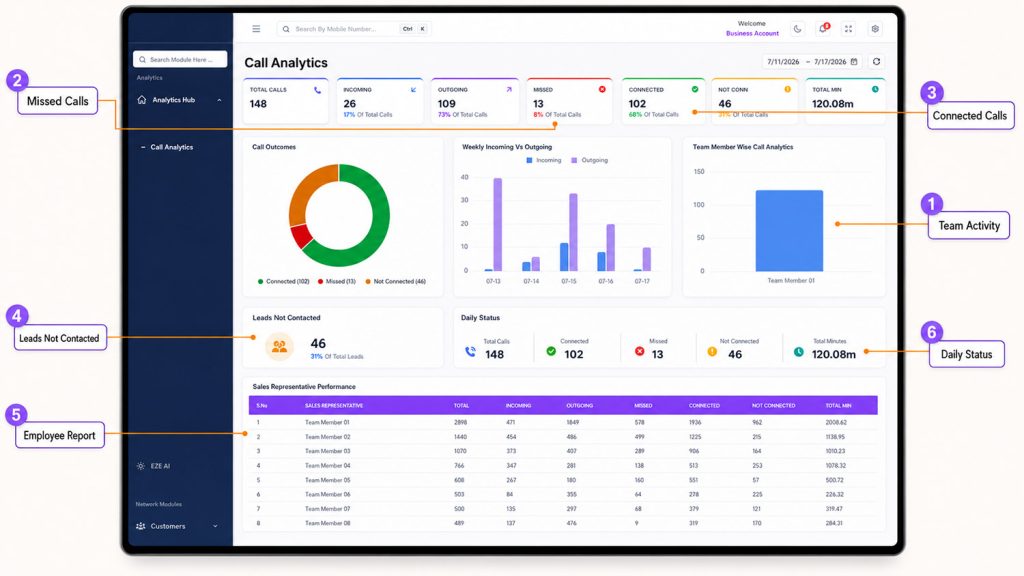
7.1 Central dashboard and comprehensive call visibility
A central dashboard can organise incoming, outgoing, missed, rejected, unanswered, unique and connected business-call activity across authorised users.
Outcome: Faster visibility and less dependency on screenshots or manual MIS.
7.2 Employee, number and working-hours management
Administrators can manage authorised users, business numbers, reporting hierarchy and role permissions. Working-hours views help management understand when calling activity occurs.
Outcome: Clearer ownership, controlled access and better workforce planning.
7.3 Team and employee-wise reports
Reports may include call volume, unique calls, connected calls, average duration, working periods and activity patterns. They should be combined with lead movement and follow-up completion rather than used as a raw call-count scoreboard.
Outcome: Evidence-based coaching and more balanced reviews.
7.4 Missed, unattended and unconnected exception lists
A missed or never-attended list helps identify calls that require recovery. An unconnected-attempt list highlights numbers the team tried but could not reach.
Outcome: Managers review unresolved communication instead of every call.
7.5 Lead capture, distribution and status management
The system can connect a number with a lead, assign ownership and maintain source, stage, notes and status. A “leads not contacted” report shows where the sales process has not started.
Outcome: Less lead leakage and faster response.
7.6 Follow-up and callback reminders
Employees can schedule the next conversation and managers can review due or overdue actions.
Outcome: Better commitment management and more disciplined nurturing.
7.7 Call history and communication summary
A central history helps authorised users review previous interaction activity and key notes when a territory changes or an employee is unavailable.
Outcome: Stronger continuity and less dependence on individual memory.
7.8 Daily, periodic and exportable reports
Daily status reports and scheduled weekly or monthly summaries support management review. Export options can help teams share or archive analysis according to the selected scope.
Outcome: Consistent reporting with less preparation effort.
7.9 Call-recording synchronisation, where supported and enabled
Recording availability depends on the Android device, operating-system behaviour, configuration, company policy and applicable consent or legal requirements. The accurate public description is call-recording sync where supported and enabled, not a universal promise that every device records every call.
Outcome: Authorised coaching and quality review where the setup supports it.
7.10 CRM, API and WhatsApp workflow integration
Call activity can be evaluated for connection with EzeOne Lead Management, another CRM, ERP, WhatsApp or a custom application. The connector, fields, authentication and sync direction should be defined during discovery.
Outcome: Less duplicate entry and a more complete customer timeline.
7.11 Dual-SIM, exclusions and separation controls
The organisation can scope the workflow to the approved business SIM and configure exclusions where supported.
Outcome: Clearer separation of business and personal communication.
7.12 Role-based access and security
Sales users, managers and administrators can receive different levels of access. EzeOne materials describe encrypted storage for sensitive information and HTTPS-secured web access.
Outcome: Necessary visibility without unrestricted access.
8. Cross-Industry Use Cases Across Business Functions
A business-ready system should support more than a telecalling desk.
Sales enquiries and quotations: Associate the call with a lead, assign the right salesperson and schedule the next action.
Manufacturing, distribution and channel sales: Maintain history for availability, quotations, orders, dispatch and outstanding partner queries. CRM, dealer-management or ERP integration can connect the call with the operational record.
Field sales: Let mobile employees use a familiar business-phone process while management receives central visibility.
Payment follow-ups: Record the conversation outcome, promised date and next action instead of relying on a diary.
Warranty and service: Create or update a ticket, preserve context and route the case to the correct service owner.
Real estate, healthcare, education and recruitment: Track property enquiries and site visits, appointment confirmations, admission counselling, candidate conversations and scheduled callbacks without losing context.
Professional services and campaign leads: Connect enquiries from websites, B2B portals, referrals, events and advertising campaigns with call activity, lead ownership and status.
9. AI Calling and Communication Automation
Smart call management creates visibility around human conversations. AI calling can add automation around repetitive, scheduled communication.
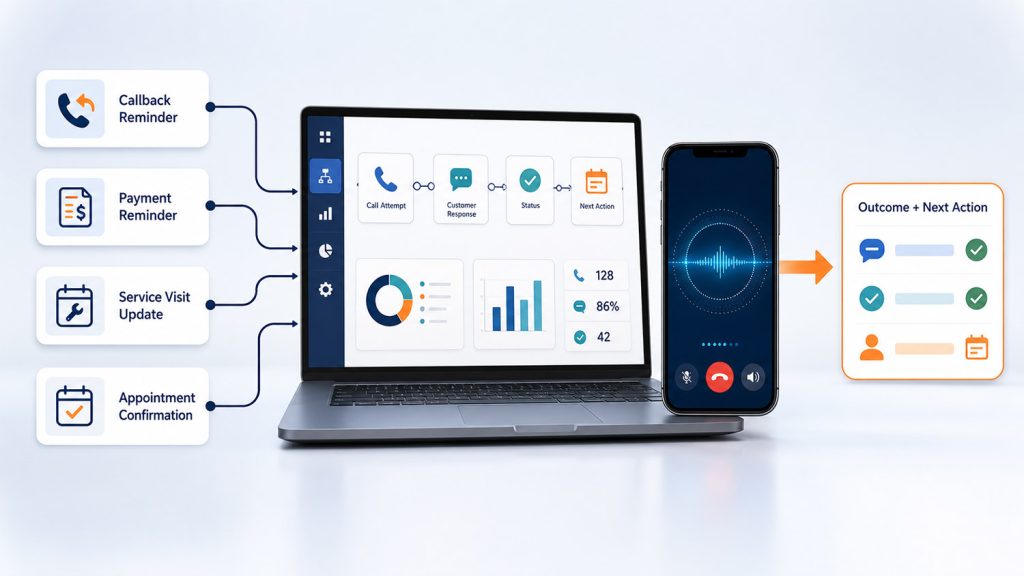
EzeOne’s AI Calling Assistant is positioned as an optional automation layer that can use system data to trigger voice calls for callbacks, reminders, follow-ups and service updates.
Possible use cases include:
- Calling a lead at the requested callback time
- Reminding a customer about an appointment or service visit
- Following up on a payment commitment
- Confirming a scheduled demonstration
- Informing a customer about ticket or order status
- Capturing the call outcome and triggering a next action
The important distinction is that AI calling should not be introduced simply because it is fashionable. It should automate a defined, repeatable conversation where the system already has trusted data and a clear objective.
A good workflow may be:
Pending callback detected → AI call initiated → customer response captured → status updated → human follow-up assigned when required.
AI can reduce repetitive manual calling load, but it should not replace human judgement in complex sales, negotiation, complaint or relationship conversations. Organisations should begin with narrow use cases, review response quality and provide an easy path to a human employee.
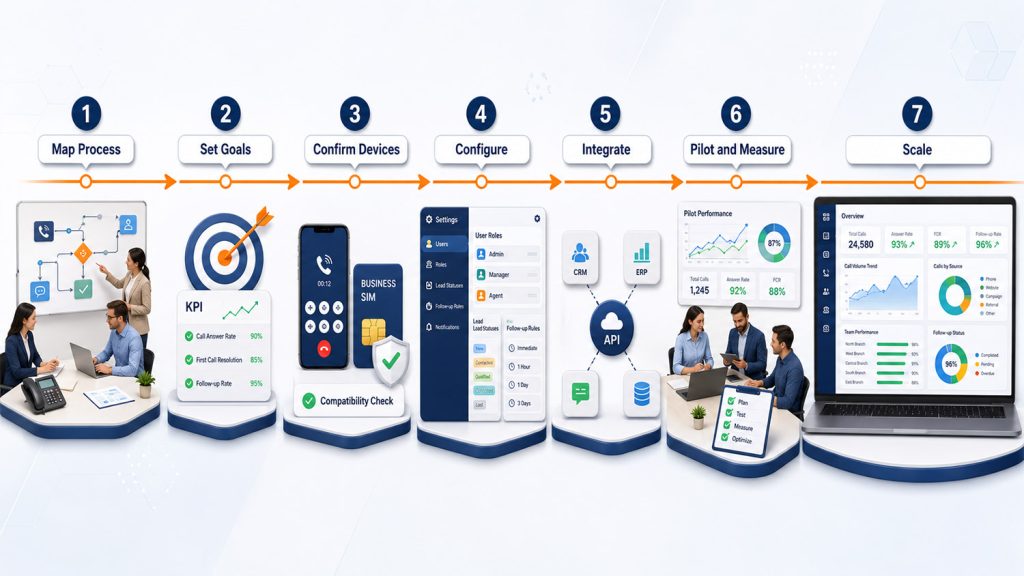
10. A Practical Implementation Roadmap
Technology installation is only one part of the project. A successful rollout requires process design, employee communication and management discipline.
Phase 1: Map the current process
Document users, numbers, call categories, current reports, missed-call handling, lead creation and systems already in use.
Phase 2: Select measurable goals
Choose two or three pilot objectives, such as reducing leads not contacted, improving missed-call callbacks or cutting manual MIS preparation.
Phase 3: Confirm devices and policy
Validate Android compatibility, approved business SIMs, dual-SIM rules, exclusions, recording support and device ownership.
Phase 4: Configure roles and workflows
Set up users, managers, branches, lead statuses, follow-up rules and reports. Give each role only the access it requires.
Phase 5: Define integrations
Document the source system, API access, fields, authentication, sync direction and error handling. Avoid vague “CRM integration” promises without a data map.
Phase 6: Pilot, train and measure
Start with one team or branch. Train employees on reduced duplicate work and managers on exception-based coaching. Compare baseline and pilot results before scaling.
Phase 7: Scale in stages
Refine statuses and reports, then add branches, integrations or AI-calling use cases after the core workflow is stable.
11. Privacy, Employee Adoption and Responsible Rollout
Call visibility should improve the business process, not create a surveillance culture.
Call logs, phone numbers, recordings, notes and lead records can contain personal data. Organisations should use approved business numbers, define the lawful purpose of processing, communicate the policy clearly, restrict access by role and apply appropriate notices or consent where required. Legal and telecom requirements should be reviewed for the specific deployment.
A responsible policy should answer:
- Which business number is connected?
- What call information is captured?
- Are personal or internal numbers excluded?
- Is recording enabled, and on which devices?
- Who can listen to recordings?
- How long is data retained?
- Can employees access their own activity?
- How is the data used in performance reviews?
- What happens when an employee leaves?
Management communication matters. Employees may initially hear “call monitoring” and assume the system exists only to find mistakes. The organisation should explain the real operational goals: faster callbacks, fewer repeated updates, better customer history, less manual MIS and more objective coaching.
The best message is simple:
Track the business process. Support the people. Protect personal boundaries.
12. How to Evaluate a Call Management Solution
Compare the workflow, not only the feature list.
Check whether the platform fits approved business SIMs, existing numbers, virtual numbers or a hybrid setup. Confirm that it connects calls with owners, statuses and follow-ups instead of showing logs alone. Test real use cases such as sales, payment, appointment and service calls.
Review exception reports for missed calls, leads not contacted and overdue actions. Verify CRM/API scope with a written data map. Test actual device and recording compatibility. Confirm role-based access, exclusions, security, report exports and implementation support.
Finally, evaluate whether the calling layer can later connect with lead management, sales force automation, channel-partner management, warranty service, WhatsApp, dashboards or AI calling. A strong provider should map the existing process before recommending the configuration.
13. Frequently Asked Questions
What is call management software?
It tracks and organises approved incoming and outgoing business-call activity. A complete system can also connect calls with leads, follow-ups, employee reports and a central dashboard.
Why do businesses need it?
Business calls may relate to enquiries, sales, appointments, orders, payments or service. When the conversation stays in one phone, the next action can be delayed or forgotten.
Is EzeOne Smart Calling only for telecallers?
No. It can support inside sales, field sales, channel-partner support, service coordination, accounts follow-up and other authorised business users.
Does SIM-based calling need the internet?
The voice call uses the mobile network. Internet connectivity is still required to synchronise application data with the cloud dashboard.
Does EzeOne record every call automatically?
Recording is device-, setup-, policy- and compliance-dependent. Use the wording call-recording synchronisation where supported and enabled.
How does it help recover missed calls?
It makes missed and unattended activity visible so the organisation can assign a callback, review completion and connect the outcome with a lead or customer.
14. Final Takeaway: The Call Ends, but the Workflow Should Not
Businesses do not need more software for the sake of software. They need fewer gaps between customer communication and business action.
A missed call should become a callback responsibility.
A new enquiry should become an owned lead.
A customer query should reach the correct department.
A payment commitment should create the next follow-up.
A service conversation should remain connected with the customer history.
A manager should see exceptions without waiting for manual MIS.
EzeOne Smart Calling is designed to make approved business-call activity visible, actionable and reportable. It can support SIM, cloud or IVR-based workflows as configured, connect call activity with leads or business records, provide team reporting and extend into CRM, WhatsApp, service, channel-partner or AI-calling workflows according to the agreed scope.
The most useful next step is not a generic product tour. It is a short workflow review.
Bring three things to the discussion:
- Your team structure
- Your main business-call types
- Your current CRM, ERP, Excel or WhatsApp process
In a focused 20-minute demo, EzeOne can show how missed calls, lead ownership, follow-ups, employee reports and integration could work for your organisation.